

Cable Management: How to Organize Cables at Your Desk and Home
Cable management is the art and technique of organizing electronic cables so they are neat, not scattered, and easy to manage. In this digital era, the average home has dozens of cables - from smartphone chargers, TV cables, WiFi routers, to work computer setups. Without proper cable management, these cables become an eyesore, difficult to clean, and can even become a tripping hazard.
Based on our conversations with regular Sesoris customers, organization problems are usually solved not by buying more, but by rearranging what's already there.

Tangled cables are not just an aesthetic problem. Messy and intertwined cables make troubleshooting a nightmare - imagine having to find which cable is problematic among dozens of overlapping cables. Additionally, disorganized cables also accelerate damage due to excessive bending and friction between them.
Key Takeaways: > - Choose products with clear safety labels (food-grade, BPA-free) for daily use > - Investing slightly more in quality materials (glass, grade 304 stainless steel) saves long-term costs > - Match sizes to family needs, neither too large nor too small > - Local marketplaces like Tokopedia, Shopee, and Sesoris offer competitive prices with maintained quality
Why is Cable Management Important?
Safety
Cables scattered on the floor are a common cause of tripping, especially dangerous for small children and the elderly. Tangled cables can also cause short circuits because cable insulation wears away from friction. In extreme cases, cables crushed by furniture or bent sharply can cause fires. For additional information, also see the guide from The Spruce.
Productivity
A desk full of tangled cables psychologically affects focus and productivity. Research from Princeton University shows that cluttered environments reduce the brain's ability to process information. A clean desk with organized cables creates a more conducive work environment.
Ease of Maintenance
Organized cables make cleaning your work area much easier. You don't need to lift and move piles of cables every time you want to clean your desk or floor. If a device needs to be replaced or repaired, you can quickly identify and disconnect the right cable.
Longer Device Lifespan
Cables that are bent sharply or pulled excessively will experience internal damage faster. Good cable management ensures each cable has enough space, is not bent at critical points, and is not burdened by the weight of other cables.
First Steps: Audit Your Cables
Before buying any cable management products, do a cable audit first. This helps you understand the scale of the problem and determine the right solution. For additional information, also see the guide from Real Simple.
- Unplug all cables from devices and power strips
- Identify each cable - label them temporarily using masking tape and marker
- Discard unused cables - old charger cables, cables for devices you've sold, or damaged cables
- Group by area - desk cables, TV/entertainment cables, kitchen cables, and so on
- Measure required lengths - cables that are too long create excess that is difficult to organize
- Note the quantity and type of cables in each area to determine what cable management products you need
Cable Management Products You Should Know About
The market offers various cable management products with different functions. Understanding each product's function helps you choose what best suits your needs.
| Product | Function | Best For | Price Range |
|---|---|---|---|
| Cable clip | Hold cables in one position | Desk, walls | $0.63 - $3 |
| Cable sleeve | Bundle multiple cables together | Behind desk, TV setup | $1.5 - $6 |
| Cable tray | Hold cables and power strips | Under desk | $3 - $12 |
| Velcro strap | Tie cable bundles together | Universal, reusable | $1 - $3 |
| Cable box | Hide power strips and adapters | TV area, desk | $3 - $9 |
| Cable raceway (ducting) | Hide cables along walls | Walls, baseboards | $2 - $6/meter |
| Spiral wrap | Bundle several cables together | Behind devices | $1 - $3.5 |
| Magnetic cable holder | Hold charger cable ends | Desk, bedside table | $1.5 - $4.5 |
Cable Management at Your Desk
The desk is the area that most needs cable management due to the high concentration of cables - monitor, keyboard, mouse, laptop charger, smartphone charger, desk lamp, and speaker all require cables.
Steps to Organize Desk Cables
- Install a cable tray under your desk - this is the most impactful step. A cable tray holds all cables and power strips under the desk, out of sight. Choose a model that can be screwed or clamped to the underside of your desk
- Use cable clips on the desk edge - attach 3-4 cable clips to the back edge of your desk to hold charger cables and mouse cables so they don't fall when unplugged
- Bundle cables that run in the same direction - cables going the same way (for example, from desk to power strip) should be tied together using velcro straps or cable sleeves
- Replace cables that are too long - a 3-meter charger cable that only needs 1 meter creates 2 meters of excess that's hard to organize. Replace it with a cable of appropriate length or coil the excess neatly
- Label each cable - use cable labels or cable tags to easily identify cables without having to trace them from end to end
Cable Setup for Standing Desks
Standing desk users face an additional challenge because the desk moves up and down. Cables must be long enough to accommodate this movement without being pulled or pinched. Use a cable chain mounted from the back of the desk to the floor. Cable chain moves flexibly with the desk position while keeping cables organized.
Cable Management in TV and Entertainment Areas
TV areas usually involve many devices - TV, decoder, soundbar, game console, router - each with power cables and connection cables.
- Use cable raceway on the wall from TV to TV stand to hide cables. Paint the raceway to match your wall color so it's not visible
- Install a power strip behind the TV stand so all cables connect at one hidden point
- Bundle cables with spiral wrap behind the TV stand to avoid random cable piles
- Use a cable box to hide power strips and large adapters that are difficult to organize
- Label each cable at the end that connects to the power strip - this is very helpful when you need to unplug a specific device
Cable Management Throughout Your Home
Besides your desk and TV area, there are several other areas in your home that need cable management attention.
Charging Area
Create one central charging station in your home using a cable box and multi-port USB charger. Place it in an easily accessible area like a foyer table or sofa side table. All family members can charge their devices in one place without charger cables scattered throughout the rooms.
Kitchen
Kitchen appliance cables like blenders, toasters, and rice cookers should be coiled neatly when not in use. Use velcro straps or cable organizers that stick to the back of appliances. Avoid cables hanging near the stove or sink due to safety risks.
Bedroom
Attach cable clips to the side of your bedside table to hold smartphone charger cables. Use a magnetic cable holder so the cable end doesn't fall behind the table when your phone is unplugged. For bedside lamps and alarm clocks, organize cables behind the table using adhesive cable clips.
DIY Cable Management Techniques
Not all cable management solutions need to be purchased. Some creative techniques can be done with materials you already have at home.
- Binder clips as cable holders - clamp large binder clips to the edge of your desk, then thread cables through the handles. A cheap and effective solution for holding charger cables
- Toilet paper rolls as cable organizers - coil excess cables and insert them into cardboard rolls. Label and store in a drawer or box
- Bread clips as cable labels - write the device name on a bread clip, then clip it onto a cable. Simple way to label cables on a power strip
- Pegboard for work areas - install a pegboard on the wall behind your desk, use hooks to hang cables and small accessories
- Shoebox as cable box - drill holes in the sides of a shoebox for cables, store the power strip inside. Can be decorated to look nicer
Cable Management Mistakes to Avoid
- Tying cables too tightly - cables tied too tightly can suffer internal damage. Use soft velcro straps, not hard plastic cable ties
- Bending cables at sharp angles - sharp bends damage the conductors inside the cable. Make sure all bends have a wide enough radius
- Mixing power cables and data cables - power cables generate electromagnetic interference that can disrupt data cable signals. Separate them if possible
- Using permanent cable ties for frequently plugged/unplugged cables - use reusable velcro straps for cables that need flexibility
- Ignoring ventilation - cables bundled too tightly without ventilation can generate excess heat, especially high-wattage power cables
Related Articles
Explore other guides from Sesoris to complement your knowledge:
- Wadah Makanan
- Simple But Attractive Living Room Decor Affordable Ideas 2026
- How to Choose the Right Stove Stand for Your Kitchen
- Organization Ideas For Small Closet Transform Tiny Space 2026
Related Products from Sesoris
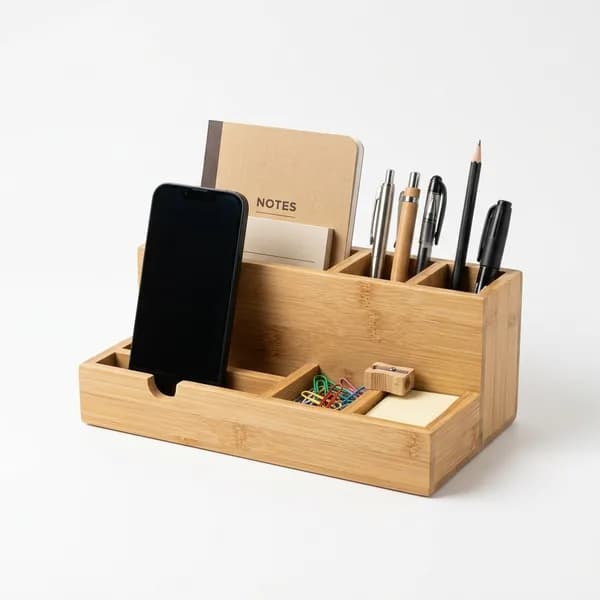
If this guide matches the way you want to organize your space, start with LED Desk Lamp with Wireless Charger and Bamboo Desk Organizer. For more options in the same use case, browse the Desk & Workspace collection before comparing generic marketplace listings.
I prefer this softer path because readers who arrive from informational articles usually are not ready for a hard sell. A small related-product block gives them a practical next step while keeping the article useful first.
FAQ - Frequently Asked Questions
1. Can cable management be done without drilling walls?
Yes, many cable management solutions use adhesive without needing to drill. Adhesive cable clips, cable raceway with double-sided tape, and cable trays with clamps can be installed without damaging walls or desks. Make sure surfaces are clean and dry before applying adhesive products for optimal adhesion.
2. How often should cable management maintenance be done?
Do a light check every 1-2 months - make sure no cables are loose, labels are still readable, and there's no excess dust. Major reorganization is usually needed every 6-12 months or whenever you add/replace electronic devices.
3. Is it safe to combine many cables in one sleeve?
It's safe as long as not all cables are high-load power cables. Don't combine more than 2-3 heavy-duty power cables (for example, computer cables, heater cables) in one sleeve because it can cause heat buildup. Data cables and light-duty power cables (smartphone chargers) are safe to combine.
4. How do I organize cables in a rental home without damaging walls?
Use products with removable adhesive like Command strips. Cable raceway with 3M adhesive can be removed without leaving marks. Avoid using nails or drills. For cables on the floor, use flat cable covers laid along the baseboard.
5. What's the easiest way to start cable management for beginners?
Start with the area that bothers you most - usually your desk or TV area. Buy one cable tray and one pack of velcro straps. Install the cable tray under your desk, move all cables and the power strip into it, then tie up excess cables with velcro straps. This simple step alone makes a dramatic difference.
Q: How long do quality home organization products typically last?
With proper routine care, food-grade plastic products last 3-5 years, while borosilicate glass and grade 304 stainless steel can last 10+ years. Key factors are consistent maintenance and avoiding extreme temperature exposure.
Q: Is this product food-safe?
Ensure the product is labeled "food-grade" or "BPA-free" before using it for food storage. Safe materials include borosilicate glass, grade 304 stainless steel, and certified food-grade plastic. Avoid plastic without food safety certification, especially for hot or oily foods.
Q: How do I clean and maintain it?
Wash with mild dish soap and warm water. Avoid abrasive sponges that can scratch the surface. For stubborn stains, use a baking soda and water paste as a natural cleaner. Dry completely before storing to prevent mold and bacteria.
Q: What is the price difference between local and imported products?
Local Indonesian products are typically 30-50% more affordable than imports of similar quality. For daily home organization needs, local products meet the standard. Consider imports only if you need specific features not available in the local market.
Q: Where should I buy products like this?
You can buy at offline stores like ACE Hardware, IKEA, or major hypermarkets, or via online marketplaces like Tokopedia, Shopee, and Sesoris. Check seller ratings, real product photos, and return policies before buying online.
About Tim Sesoris
The Sesoris editorial team consists of experienced writers in home organization, minimalist lifestyle, and Indonesian e-commerce. We test products, review market trends, and craft guides based on in-depth research and field experience. All recommendations are curated to give you accurate, practical, and relevant information for Indonesian households.
For questions or suggestions, contact us through the Sesoris contact page.

Weekly Home Tips
Get home organization ideas, product picks, and exclusive deals delivered weekly.
No spam. Unsubscribe anytime.

Explore More Articles
- How to Build DIY Wood Shelves: Complete Step-by-Step Tutorial for 2026
- 30+ Best Corner Shelf Ideas to Transform Every Room in Your Home in 2026
- Refrigerator Organization: The Complete 2026 Guide to a Cleaner, Smarter Fridge
- 25+ Best Corner Cabinet Kitchen Ideas to Maximize Every Inch in 2026
- Garage Organization Systems: The Complete 2026 Guide to a Clutter-Free Garage
- 25+ Best Small Space Organization Hacks to Maximize Every Inch of Your Home in 2026
- 30+ Best Small Entryway Organization Ideas to Transform Your Home's First Impression in 2026
- Home Office Desk Organization: 20+ Smart Tips to Build a Productive Workspace in 2026