
Office Organization Ideas: Complete 2026 Guide to a Productive, Clutter-Free Workplace
Discover the best office organization ideas for shared and corporate workspaces in 2026. Boost productivity with smart desk systems, filing, and supply storage tips.

If your shared office or corporate workspace feels more like a paper avalanche than a professional environment, you are not alone. Strong office organization ideas are the foundation of a productive, stress-free workplace, whether you manage a single department or an entire floor. In this guide, I am focusing specifically on general, shared, and corporate office environments: multi-person desk systems, team filing strategies, supply storage, and workflow zones. If you are working from a compact home setup, our dedicated small home office organization ideas guide covers that angle in depth with 30+ tips tailored to tiny workspaces.
Why Office Organization Ideas Matter in a Shared Workspace
A disorganized shared office does not just look messy. It actively costs teams time, money, and morale. According to Good Housekeeping, workers can spend a significant portion of their day searching for misplaced documents or supplies, which is time that could be directed toward meaningful work. In a shared environment, the stakes are even higher because one person's clutter can disrupt an entire team's flow.
The good news is that the right office organization ideas do not require a full renovation or a massive budget. Strategic systems, smart product choices, and consistent habits can transform even the most chaotic corporate floor into a calm, high-functioning workspace.
Here is what strong office organization delivers for teams:
- Reduced time loss from hunting for documents, tools, or supplies
- Better communication because shared spaces stay navigable and professional
- Lower stress levels for everyone working in the environment
- Easier onboarding when new employees can quickly find what they need
- Stronger first impressions for clients and visitors who tour the office
Building a Smart Desk System for Shared and Open-Plan Offices
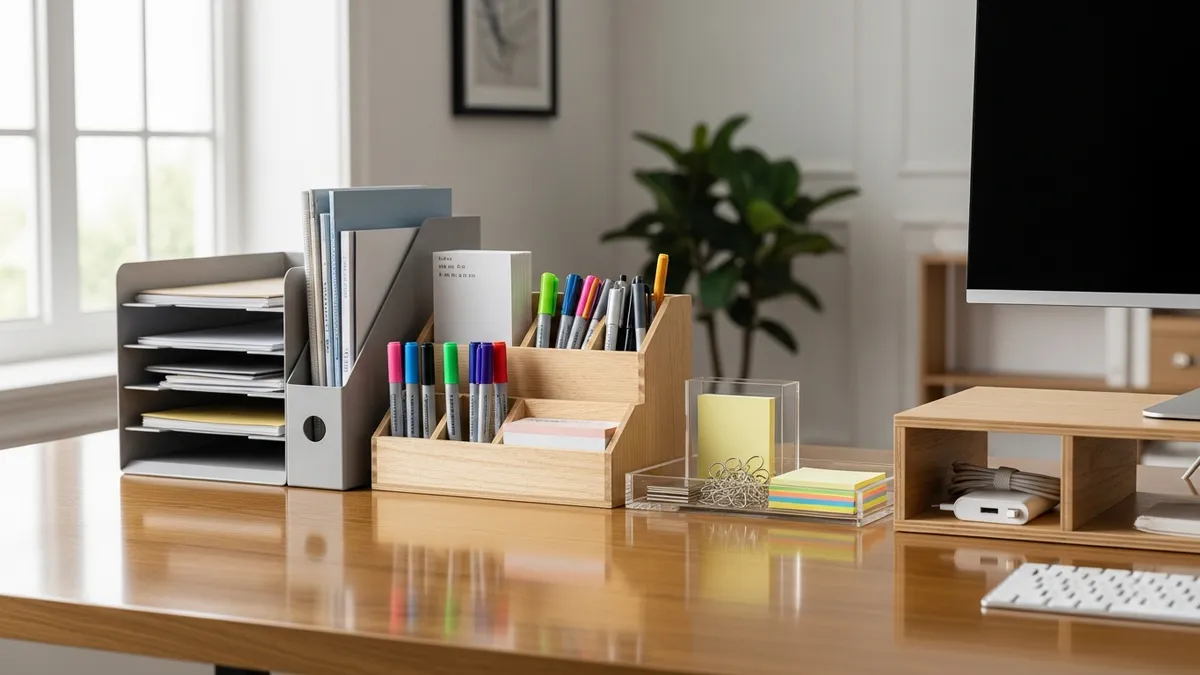
The desk is the epicenter of office organization. In open-plan or shared environments, desk systems need to balance individual needs with team-wide consistency. A chaotic patchwork of mismatched supplies and random stacks of paper breaks down fast in a busy office.
Standardize the Desk Setup Across the Team
One of the most effective office organization ideas for corporate environments is standardizing the basic desk kit for every workstation. When every desk has the same foundational tools in the same locations, the cognitive load of navigating a shared office drops dramatically.
A solid standardized desk system typically includes:
- Monitor riser or laptop stand to elevate screens and create usable storage underneath
- Inbox and outbox tray stack in a consistent location, such as the upper right corner of each desk
- Pen and pencil cup with only the tools actually used daily
- Cable management tray or spine routed underneath the desk surface to keep power cords and USB cables out of sight
- Nameplate or desk identifier for hotdesking environments so workers can claim and personalize a shared station quickly
For hotdesking offices where employees rotate between stations, consider a personal caddy system. Each team member gets a small portable caddy that holds their personal supplies and travels with them from desk to desk, keeping the shared surface clean and ready for the next person.
Manage Cables Before They Manage You
Cable clutter is one of the fastest ways a corporate workstation turns from tidy to chaotic. Our cable management guide walks through the best methods for taming cords at individual desks, including adhesive cable clips, under-desk trays, and velcro ties. In a shared office setting, routing cables through a consistent path on every desk creates a uniform look that makes the entire floor feel more professional.
Keep the Desk Surface Clear
The clearest sign of a well-organized desk is a clear surface. Encourage team members to adopt a "desktop as a tool, not a storage shelf" mindset. Everything on the desk should be actively in use. Items that are referenced occasionally belong in a nearby drawer or filing system, not permanently on the work surface.
Filing Systems: The Backbone of Office Organization Ideas That Work
Paper management is the area where most offices fall apart. Even in 2026, when so much communication is digital, physical documents accumulate fast in a corporate environment. A consistent filing system is non-negotiable for any serious workplace organization strategy.
Choose a Filing Structure That Scales
The best filing systems are ones that a new employee can understand within minutes. Overly complex hierarchies tend to collapse over time because people revert to stacking rather than filing when the system feels too complicated.
Here are the filing structures that hold up best in shared offices:
- Alphabetical works well for client files, vendor files, and HR records that are referenced by name
- Chronological is ideal for invoices, receipts, project phases, and compliance records where date order matters
- Category-based suits operational offices where files are grouped by department or function, such as Marketing, Finance, and Operations
- Color-coded overlays any of the above systems and speeds up retrieval dramatically by giving each category a distinct visual signal
Equip Every Filing Station Properly
A filing cabinet without the right supplies inside it is just an expensive box. Make sure each filing station includes:
- Hanging file folders in consistent colors for each major category
- Interior manila folders labeled with specific subcategories
- A label maker or printed label sheets for clean, legible tab text
- A purge schedule posted inside the cabinet door that reminds the team when to archive or shred old documents
Go Hybrid: Digital and Physical Together
According to Good Housekeeping, the most effective modern office filing systems combine physical and digital organization rather than trying to eliminate one entirely. Scan and digitize documents that are referenced frequently but rarely need a physical copy. Keep physical files only for originals, legal documents, and items that genuinely require a hard copy. This hybrid approach cuts physical file volume significantly without the risk of going fully paperless prematurely.
Supply Storage: Practical Office Organization Ideas for Shared Resources
In a multi-person office, shared supplies are a constant source of friction when they are not organized well. Supplies go missing, run out without anyone noticing, and accumulate in duplicate piles across different desks. A centralized, well-labeled supply station fixes all three problems.
Set Up a Centralized Supply Station
A dedicated supply area, whether it is a closet, a shelving unit, or a dedicated cabinet, should be the single source of truth for office supplies. The key principles for making it work:
- Label everything clearly. Every bin, shelf, and drawer should have a label so anyone can find and return items without asking.
- Use clear bins for small items. Transparent containers let team members see what is available at a glance without pulling everything out.
- Group by frequency of use. Daily-use items like pens, sticky notes, and tape belong at eye level. Rarely used items like spare power strips or extra ink cartridges go on higher or lower shelves.
- Set a reorder threshold. Mark the minimum quantity for each supply with a simple sticker or line on the shelf. When stock drops below that line, whoever notices adds it to the reorder list.
- Designate a single point of accountability. Rotate supply management responsibility across team members monthly to keep it fair and ensure the station stays stocked.
Organize the Supply Station by Category
A supply station that lumps everything together becomes unusable fast. Divide the station into clear zones:
- Writing tools (pens, markers, highlighters, correction fluid)
- Paper goods (copy paper, notebooks, sticky notes, notepads)
- Fasteners and adhesives (staplers, staples, tape, binder clips, rubber bands)
- Mailing and shipping (envelopes, labels, stamps, packing tape)
- Tech accessories (batteries, USB drives, cable ties, printer cartridges)
For additional inspiration on organizing supplies at the individual desk level, our office supplies organization ideas article has 25+ specific tips.
A well-labeled, centralized supply station is not just about neatness. It eliminates the invisible tax of time that every employee pays when they have to hunt for a stapler, a pen, or a ream of paper.
Creating Functional Zones in a Shared or Corporate Office
One of the most powerful office organization ideas for larger workplaces is zone design: deliberately dividing the office floor into areas designated for specific types of work. When zones are clear, the physical environment itself guides behavior and reduces the friction that comes from everyone doing everything everywhere.
The Four Zones Every Corporate Office Should Have
1. Focus Zone
This is the area designed for deep, individual work. Minimize visual clutter here. Use desk dividers or acoustic panels if the office is open-plan. Supply storage in the focus zone should be limited to what is needed for solo work: a notepad, a pen, a water bottle.
2. Collaboration Zone
The collaboration zone is where teams gather to brainstorm, review projects, and solve problems together. Equip it with a whiteboard or wall-mounted magnetic board, shared supply caddies, and enough table space for multiple people to spread out documents. Keep this zone visually distinct from the focus zone so the shift in environment signals a shift in working mode.
3. Reference Zone
The reference zone houses shared documents, filing cabinets, bookshelves with procedure manuals, and binders that multiple team members access regularly. Position it centrally so it is equally accessible from anywhere on the floor.
4. Supply and Print Zone
Group the printer, paper supply, and general supply station together. This prevents foot traffic from cutting through focus zones every time someone needs to print or grab a pen.
Use Visual Cues to Reinforce Zone Boundaries
In open-plan offices without physical walls, visual cues do the heavy lifting. Use consistent color schemes, different rug areas, distinct lighting levels, or clear signage to signal zone transitions. According to Architectural Digest, thoughtful spatial design in a workspace has a measurable impact on how employees navigate and use the space, making zone cues one of the highest-return investments in office organization.
For modular shelving that works well in office reference and supply zones, our modular shelving system guide covers the best options available in 2026.
Maintaining Office Organization: Habits That Keep the System Running
The most thoughtfully designed office organization system will collapse without consistent habits to maintain it. Systems do not maintain themselves, especially in shared environments where everyone has different natural tendencies toward tidiness.
Daily Reset Routines
Encourage every team member to spend the last five minutes of their workday resetting their desk to its baseline state. This means returning borrowed supplies, filing loose papers, clearing the desktop, and putting away personal items. A five-minute daily reset prevents the gradual drift into chaos that accumulates over weeks.
Weekly Team Sweeps
Designate a brief weekly window, perhaps 15 minutes on Friday afternoon, for the entire team to tidy common areas together. The reference zone, supply station, collaboration zone, and print area all get a quick reset. Doing it together removes the resentment that builds when a few tidy people are perpetually cleaning up after others.
Quarterly Purge and Audit
Every quarter, conduct a more thorough review of the office filing system and supply station. Shred or archive outdated documents, discard dead pens and dried-out markers, restock supplies that are running low, and evaluate whether the zone system is still meeting the team's needs. Offices evolve, and the organization system needs to evolve with them.
Communicate the System Clearly
No office organization system works if only one person understands it. Create a simple one-page reference guide that explains where things go, how the filing system is structured, and how the supply reorder process works. Post it in the supply zone and share it digitally. When new employees join, walk them through the system on day one.
For labeling tools that make office-wide systems self-explanatory, our label organizer guide is a great starting point.
Choosing the Right Products for Corporate Office Organization
The right products make the difference between a system that holds up and one that falls apart within a month. Here are the product categories worth investing in for a shared or corporate workspace:
- Heavy-duty filing cabinets with smooth-gliding drawers and locking mechanisms for sensitive documents
- Modular wire shelving units for supply stations and reference zones, adjustable as needs change
- Labeled, stackable clear bins in uniform sizes for supply storage
- Cable management trays and spines mounted under desks to eliminate cord clutter
- Consistent desk accessories in matching colors or finishes for a cohesive look across workstations
- Whiteboard or magnetic wall panels for the collaboration zone
- Portable personal supply caddies for hotdesking environments
- Label makers or a label printing system for consistent, legible labeling across all storage zones
You can browse Sesoris organization products for a curated selection of storage and organization solutions that work across home and office environments. Our best sellers include several desk and workspace organization favorites, and new arrivals are updated regularly with fresh solutions for modern workplaces.
Related Products from Sesoris
If you want to turn this guide into a real setup, start with Slide-Out Cabinet Drawer, Black Steel and Stackable Storage Bins, 24 Pack. For broader options, browse the Home & Decor collection so the article journey does not stop at reading only.
Our practical rule: choose one product that solves the main clutter problem first, then add supporting organizers only when the daily workflow is already clear. This keeps the shopping path useful, not pushy.
FAQ: Frequently Asked Questions About Office Organization Ideas
Q: Where should I start when organizing a chaotic shared office?
Start with the desk system because it affects every person on the team immediately. Standardize the basic setup, clear the surfaces, and implement a cable management solution. Once desks are under control, move on to filing and then the supply station. Trying to do everything at once usually results in partial systems that do not hold.
Q: How do I get the whole team on board with a new office organization system?
Involve the team in designing the system rather than imposing it from the top down. Ask team members what frustrates them most about the current setup and use those pain points to guide the new approach. When people feel ownership over a system, they are far more likely to maintain it.
Q: What is the best filing system for a small corporate team?
For teams of fewer than 20 people, a color-coded category-based system is usually the most effective. Assign a color to each major category, label everything consistently, and keep the hierarchy to two levels: category and subcategory. Simpler systems get used more consistently.
Q: How often should office supplies be audited and restocked?
A light check every two weeks prevents total stockouts. A full audit and reorder every four to six weeks keeps the supply station properly stocked without over-purchasing. Mark minimum stock levels directly on the storage bins so anyone can trigger a reorder without needing to remember specific quantities.
Q: Are open shelves or closed cabinets better for office supply storage?
Both work, but they serve different purposes. Open shelves with labeled bins are best for supplies accessed daily because they allow fast retrieval. Closed cabinets are better for supplies that are accessed less frequently, items that look messy when visible, or sensitive materials. Many well-organized offices use a combination of both.
Q: What is the difference between organizing a shared office and a small home office?
The primary differences are scale and shared accountability. A home office is optimized for one person's workflow, while a shared office must accommodate multiple working styles, shared resources, and consistent systems that survive staff turnover. For a deep dive into the home office angle, check out our small home office organization ideas guide.
Conclusion
Great office organization ideas for shared and corporate workspaces come down to three things: a consistent desk system that works for everyone, a filing structure that scales without becoming complicated, and a supply station that practically runs itself with clear labels and reorder thresholds. Layer in intentional zone design and team-wide maintenance habits, and you have an office that stays organized long after the initial setup.
Whether you are starting from scratch or refreshing a system that has drifted into chaos, the strategies in this guide give you a clear roadmap. Start with one area, build momentum, and involve your team at every step.
Ready to equip your workspace with the right tools? Explore the full range of storage and organization products at Sesoris and find everything you need to build a productive, clutter-free office in 2026. Browse our collections for workspace-specific bundles, or head to all products to shop the complete catalog.

Liked this guide?
Get new organizing guides and the occasional new product by email. No spam, unsubscribe anytime.
Related articles

Explore more articles
- 25+ Best Garage Bike Storage Ideas to Transform Your Space in 2026
- 25 Small Kitchen Organization Tips to Maximize Every Inch in 2026
- 3 Tier Spice Rack: Complete 2026 Buying Guide
- How to Organize a Tiny Kitchen: 20+ Smart Ideas for 2026
- How to Declutter Your Home: Complete 2026 Guide
- Glass Containers Food Storage: The Ultimate Inspiration Guide to a Beautiful, Organized Kitchen in 2026
- 25+ Best Small Coat Closet Organization Ideas to Maximize Your Space in 2026
- 3-Tier Spice Rack: Review and Buying Tips